Linux Services
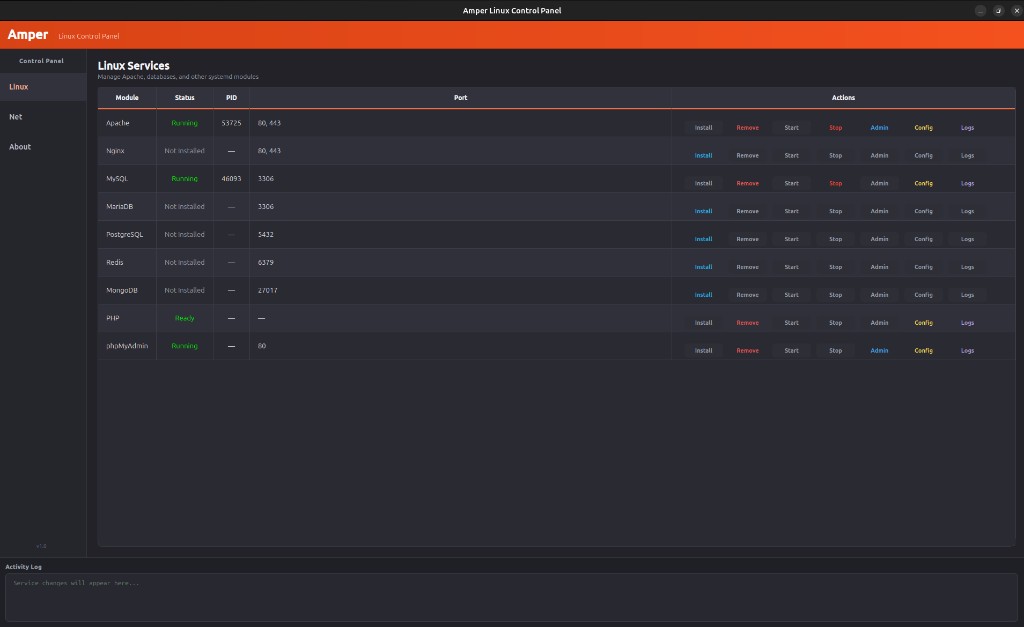
See every module at a glance: status, PID, and ports. Install or remove packages, start and stop services, open admin URLs, edit configs, and view logs — all from one table.
 Amper
Linux Control Panel
Amper
Linux Control Panel
Amper is a desktop app for managing Apache, PHP, MySQL, Nginx, databases, and other systemd services — without memorizing terminal commands. Built for developers coming from XAMPP or Laragon on Windows.
What you get
Amper wraps system tools you already use — systemctl, pkexec, and your package manager — in a clean dark UI with real-time status, port monitoring, and quick access to configs and logs.
See every module at a glance: status, PID, and ports. Install or remove packages, start and stop services, open admin URLs, edit configs, and view logs — all from one table.
Live port monitor powered by psutil. See which process listens on each port and get instant conflict warnings when two services fight for the same port.
One-time permission setup via polkit so Start, Stop, Install, and Remove work without repeated password prompts. Developer info and social links built in.
Every service action is logged with timestamps at the bottom of the window. Know exactly what happened and when.
Minimize to tray and control running services from the context menu. Amper stays out of your way while you code.
Works with apt, dnf, yum, pacman, and zypper. Discovers systemd units automatically — only shows services that exist on your machine.
Each row gives you seven actions — color-coded for speed:
Modules
Amper auto-detects installed systemd units and filesystem tools. Modules that are not on your system show as “Not installed” with an Install button ready to go.
Download
Amper is free and open source. Install from the Snap Store, build from source, or grab an AppImage from GitHub Releases.
sudo snap install amper --classic
amper
Classic confinement is required for systemctl and package manager access.
git clone https://github.com/HaSh3003/Amper---Linux-Control-Panel
cd Amper
python3 -m venv env && source env/bin/activate
pip install -r requirements.txt
python main.py
See README for full setup.
# In the app: About → Grant Permissions (once)
# Or manually:
pkexec bash setup_permissions.sh
newgrp amper
Credits
Software Engineer
Amper is an open-source desktop control panel for the Linux platform. Designed and developed by Hesham Yasser. Licensed under MIT — contributions welcome.
Open Source
Amper is released under the MIT License. You can read the source, report issues, suggest features, and contribute pull requests on GitHub.
MIT — use commercially, modify, and distribute with attribution.
Full text in the LICENSE file in the repository.